How to Sell Digital Products on Your Blog Using Gumroad (Step-by-Step Guide)
Why Digital Products Are One of the Best Ways to Monetize a Blog
Digital products are one of the highest-profit income streams available to bloggers. Unlike physical products, digital products can be created once and sold repeatedly.
💰 High Profit
No inventory or shipping costs.
⚡ Instant Delivery
Customers receive products immediately.
🌍 Global Sales
Sell worldwide while you sleep.
📈 Scalable
Unlimited earning potential.
Start Selling Digital Products Today
Create, upload, and sell your digital products using Gumroad.
Get Started →Gumroad Setup Step-by-Step
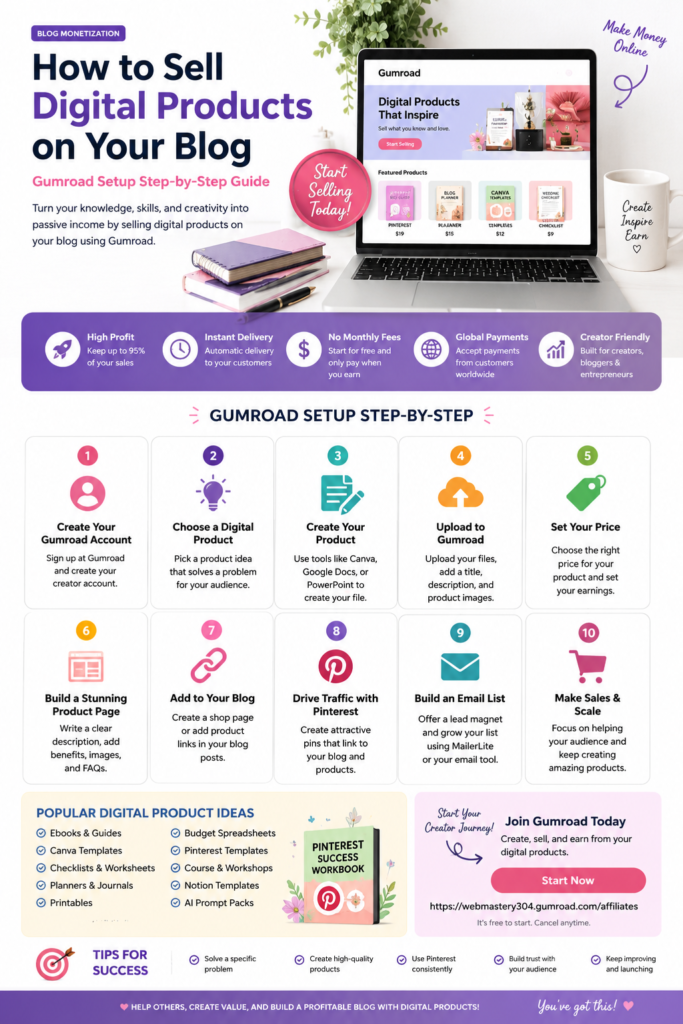
1. Create Your Gumroad Account
Sign up, complete your profile and connect your payment information.
2. Choose a Digital Product
Select a product that solves a specific problem for your audience.
3. Create Your Product
Use Canva, Google Docs, Notion, or PowerPoint.
4. Upload to Gumroad
Add files, descriptions, pricing, and product images.
5. Build a Sales Page
Show benefits, previews, FAQs and testimonials.
6. Add Products to Your Blog
Create a shop page and link products throughout your content.
Best Digital Products for Bloggers
- Pinterest Templates
- Pinterest Keyword Workbooks
- Blog Planning Kits
- Wedding Planning Printables
- AI Prompt Packs
- Canva Templates
- Lead Magnet Bundles
- Digital Planners
- Ebooks & Guides
Use Pinterest to Drive More Sales
Pinterest can send traffic to your blog posts, landing pages, and digital products for months or even years after publishing.
- 📌 Create multiple Pins for every product.
- 📌 Use keyword-rich Pinterest titles.
- 📌 Link Pins to helpful blog content.
- 📌 Build an email list before selling.
- 📌 Schedule content consistently.
Schedule Pins, automate publishing, and grow your Pinterest traffic with Tailwind.
Ready to Start Selling?
Launch your first digital product and begin building a scalable income stream.
Start Your Gumroad Journey →